
Restore Old Photos
Bring Faded Memories Back in Seconds
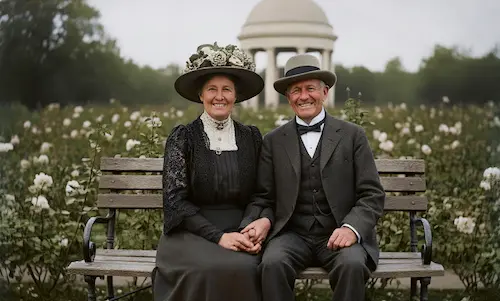
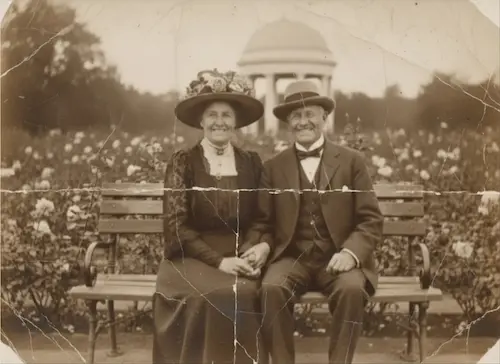
Upload Your Photo
Tap to select a photo
Free trial • No sign-up • No credit card
No photo to upload? Click on the examples below to preview the restoration effect.
How We Restore Old Photos
Unblur, Colorize, and De-scratch with One Click
Seamless Repair, Zero Trace
Whether it's tears, creases, mold, or coffee stains, AI intelligently analyzes surrounding pixels for 'context-aware' filling. It seamlessly restores missing patterns and textures, leaving no trace of repair.
Restore Memories, Not Just Colors
This isn't just 'colorizing black and white'. Our AI analyzes the era, lighting, and physical texture to 'reconstruct' historically accurate colors. Say goodbye to cartoonish tones—embrace lifelike skin tones and ambient lighting.
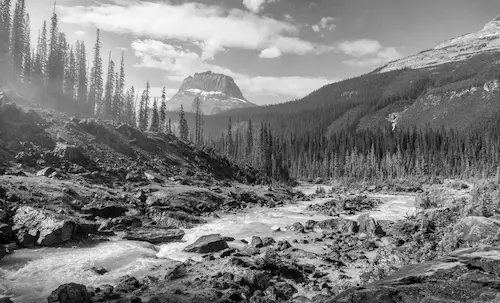
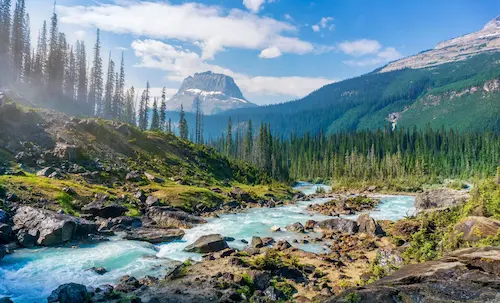
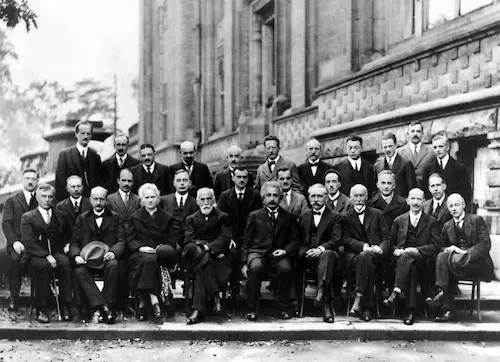
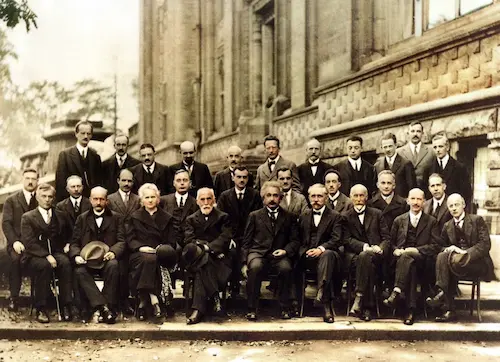
Recreating Scientists' Smiles
See the stunning AI restoration of the 1927 Solvay Conference. Our AI, trained on millions of faces, deeply reconstructs the clear, natural smiles of Einstein & Curie.
Restore Old Photos in 3 Easy Steps
Bring your memories back to life in seconds. No sign-up, no complex software. Just upload, restore your old photo, and download.
1. Upload Photo
Drag & drop a scanned photo. We support JPG, PNG, and WEBP.
2. Restore Old Photos
Our AI automatically fixes scratches, sharpens details, and colorizes your image.
3. Download & Share
Preview the result and download your restored photo in high-definition.
Why Choose Us
Why Choose PhotoRestore.ai
Traditional restoration takes weeks and costs hundreds — PhotoRestore.ai lets you restore old photos in seconds, no skills required.
Traditional Restoration
PhotoRestore.ai
Who It's For
Who Restores Old Photos — and Why
From kitchen-table family projects to professional archiving, restoring old photos serves moments that matter.
Families
Shoeboxes of faded grandparent photos that younger generations have never seen clearly. Restoring old photos turns a blurred 1950s snapshot into a face children recognize — bridging decades in a single image.
Anniversary Gifts
A parent's yellowed wedding photo restored for a golden anniversary or memorial. AI recovers the lace detail on a veil, the groom's expression, and the bouquet's original color — a gift no store can match.
Family Archive Projects
Scanning preserves damage; AI completes the job. Every scanned print gets cleaned, sharpened, and color-corrected in seconds — creating a permanent digital archive that looks the way those photos did when new.
Photographers
Clients walk in with stacks of old prints hoping for restoration. AI handles the heavy lifting in seconds, letting photographers restore old photos for clients at real margins.
Designers
Vintage campaigns, heritage branding, memorial books — designers need clean retro imagery fast. AI strips away scratches and stains while preserving the authentic film-era look that makes the design sing.
Historians & Archivists
Museums and archives hold thousands of deteriorating photographs. Restoring old photos in batches makes exhibition-ready prints possible at scale — sharper faces, recovered text, and faithful color for public display and research.
The Memories People Brought Back
Real stories from people who restored their old photos.
Margaret T.
I was clearing out some old boxes and found a few photos of my mom when she was young, all yellowed and hard to make out. My daughter came over asking who it was, and I said that's Grandma. I fixed one up and there was my mom in her twenties, clear as day. My daughter just stared and said, “So that's what Grandma looked like.”
David K.
My parents' 50th anniversary is coming up, so I wanted to surprise them. I dug out their old wedding photo. The whole thing had faded, and the edges were starting to flake. I ran it through, and when I showed them, my mom covered her mouth and laughed, and my dad just looked at it for a long while and said it felt like being back there.
James R.
Three generations of family photos had been sitting in old metal tins and had started to get damp. I only meant to scan them for backup, but I tried fixing a few, and the one of my grandpa holding my dad came out so much sharper. I've done about sixty over the past couple of weeks and sent a few to the older relatives. Honestly, they're more into it than I am. They keep asking me to do the rest.
Sarah L.
I run a photo studio, and people are always bringing in old pictures of their grandparents and asking if I can fix them. I used to spend an hour or two per photo in Photoshop. Charge too much and they balk; charge too little and I lose money, so I turned a lot of them away. Now it handles the basic restoration, and I just do the touch-ups. Some jobs I wouldn't have taken before, I can say yes to now.
Rachel B.
I'm a designer, and I recently put together an anniversary book for a client using a lot of their old photos. The scans were full of scratches and little specks, and they looked rough dropped straight into a layout. I ran them through first, and most came out a lot cleaner, then I handled the color and layout myself. A few still needed manual work, but it beats cleaning them one by one.
Carlos B.
I've lived abroad for over ten years now and mostly keep up with family over video calls. A while back, my mom scanned a bunch of our old photos and sent them over: family portraits, the old house back home, all of it a bit faded and washed out. I've been restoring them in the evenings and putting them into an album. When I miss home, I just open it and look through them.
Explore our tools
Specialized photo restoration tools
Every photo is damaged differently. Pick the tool built for your problem — each one is fine-tuned for a single kind of damage.
Restore old & faded photos
Bring faded, yellowed, and low-contrast prints back to life with AI-powered old photo restoration.
Remove scratches from old photos
Erase deep scratches, cracks, and creases from scanned prints in a single click.
Remove stains & spots from photos
Clean water stains, mold spots, and discoloration while keeping every detail intact.
Repair torn & ripped photos
Reconnect torn edges and rebuild the missing pieces of ripped photographs automatically.
AI photo restoration online
Enhance, sharpen, and repair any old photo online with our all-in-one AI restoration engine.
Choose Your Plan
Flexible credit system - purchase as needed or subscribe, 1 credit per restore
Starter Pack
Try it out with a small pack
- 5 photo restorations
- $1.00 per photo
- Valid for 12 months
Popular Pack
Great for a personal project
- 30 photo restorations
- $0.66 per photo
- Save 33%
- Credits never expire
- HD downloads
- All AI features included
Family Pack
Perfect for family photo albums
- 80 photo restorations
- $0.50 per photo
- Save 49%
- Credits never expire
- HD downloads
- All AI features included
- All formats supported
Archive Pack
For large photo collections
- 500 photo restorations
- $0.37 per photo
- Save 62%
- Credits never expire
- HD downloads
- All AI features included
- All formats supported
- Priority support
FAQ
Restore Old Photos: Frequently Asked Questions
Everything you need to know about restoring old photos, from results to pricing.
Results & Quality
How to Use
Pricing & Privacy
Bring Your Memories Back to Life Today
Restore old photos and transform your precious memories into stunning, lifelike images.